The airport departure board — the big screen listing every departing flight, its gate and its status — is the traveler's main reference point in any airport. It's where you learn which gate to head to, whether your flight is on time and when to start walking. If you read the board correctly, you'll never miss a flight. This guide explains, step by step, how to read a departure board without mistakes.
📋 What FIDS is and where to find it
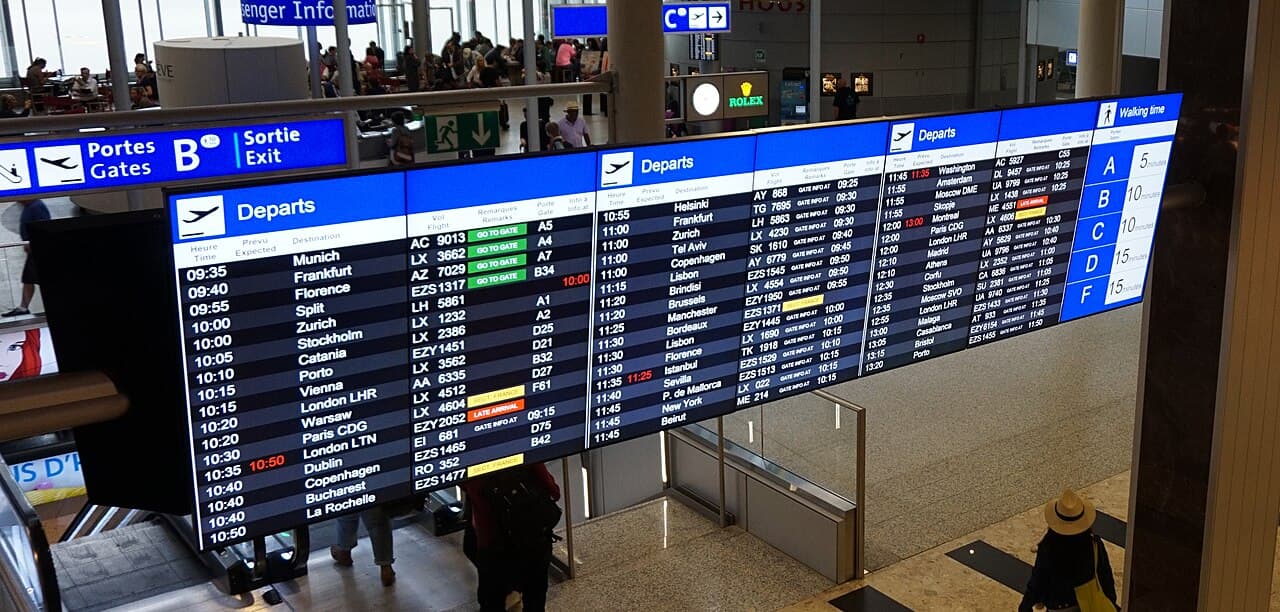
The departure board is officially called the Flight Information Display System (FIDS). You'll find it in the check-in hall, after security and in the gate area — usually as large blue or black screens. Look for the word "Departures", not "Arrivals" — the two are often side by side and easy to mix up.
Flights on the board are sorted by departure time — the soonest at the top. Find your flight number (it's on your boarding pass, e.g. "A9 123") and follow the whole row from left to right.
🔤 What the columns mean
- Flight — the flight number (airline code + digits)
- Destination / To — the destination city (sometimes just the IATA code, e.g. IST, DXB)
- Time / Scheduled — the scheduled departure time
- Gate — the gate number you board from (often appears at the last minute)
- Status / Remarks — the flight's live state (the column to watch most closely)
Destinations are sometimes written differently than you're used to (e.g. Wien = Vienna, München = Munich). If in doubt, rely on the flight number rather than the city name.
🚦 A glossary of statuses
The status column matters most — it tells you in real time what's happening with your flight. Here are the most common statuses and what they mean:
- On Time — everything is on schedule
- Go to Gate — time to start heading to the gate
- Boarding — boarding has started, you should be at the gate
- Final Call / Last Call — the last warning, get to the gate immediately
- Gate Closing / Closed — the gate is closing or closed — you may miss it
- Delayed — the flight is delayed, check the new time
- Cancelled — the flight is cancelled — see the flight cancellation guide
"Boarding" doesn't mean you have time to spare — at big hubs (IST, DXB) the walk to the gate can take 15-20 minutes. Start moving the moment you see "Go to Gate".
🔄 Gate changes and delays
Gates change often at airports — even at the last minute. That's why you shouldn't blindly trust the gate printed on your boarding pass; the board has the final word. Check the board every 10-15 minutes to see whether the Gate or Status has changed. For more on this, see the gate change guide.
If the status is "Delayed", the board usually shows a new, revised time too. Keep watching anyway — a delayed flight sometimes speeds back up and the gate closes early.
💡 Tips so you never miss a flight
- Find the board on arrival and note your terminal — see airport navigation
- Do your online check-in in advance — one less worry at the airport
- Clear security in good time so you can calmly watch the status change — see airport security tips
- Boarding usually starts 30-45 minutes before departure — details in the boarding guide
- Download the airline app — a push notification will show gate changes on your phone too
- Plan your next flight with the Travel365 price calendar — cheap dates on one screen
Tags